| 起始標籤 | 結束標籤 |
|---|---|
| 需要 | 需要 |
<ol> 有幾個屬性
| 屬性 | 值 | Deprecated or Obsolete |
|---|---|---|
| compact | true false | Deprecated |
| type | 'a' 'A' 'i' 'I' '1' | Deprecated |
舉例如下
<html>
<head>
<title>網頁標題</title>
</head>
<body>
<ol>
 <li>第一個項目符號</li>
 <ol>
  <li>巢狀項目符號一</li>
   <ol>
    <li>巢狀項目符號一</li>
    <li>巢狀項目符號二</li>
    <li>巢狀項目符號三</li>
    <li>巢狀項目符號四</li>
    <li>巢狀項目符號五</li>
   </ol>
  <li>巢狀項目符號二</li>
  <li>巢狀項目符號三</li>
  <li>巢狀項目符號四</li>
  <li>巢狀項目符號五</li>
 </ol>
 <li>第二個項目符號</li>
 <li>第三個項目符號</li>
 <li>第四個項目符號</li>
 <li>第五個項目符號</li>
 <ol>
  <li>巢狀項目符號一</li>
  <li>巢狀項目符號二</li>
  <li>巢狀項目符號三</li>
  <li>巢狀項目符號四</li>
  <li>巢狀項目符號五</li>
 </ol>
</ol>
</body>
</html>

<!-- 《程式語言教學誌》的範例程式
     http://pydoing.blogspot.com/
     檔名:listexample03.html
     功能:示範 HTML 4.01 標記語言的使用
     作者:張凱慶
     時間:西元 2011 年 5 月 -->
利用瀏覽器 (broswer) 開啟,結果如下
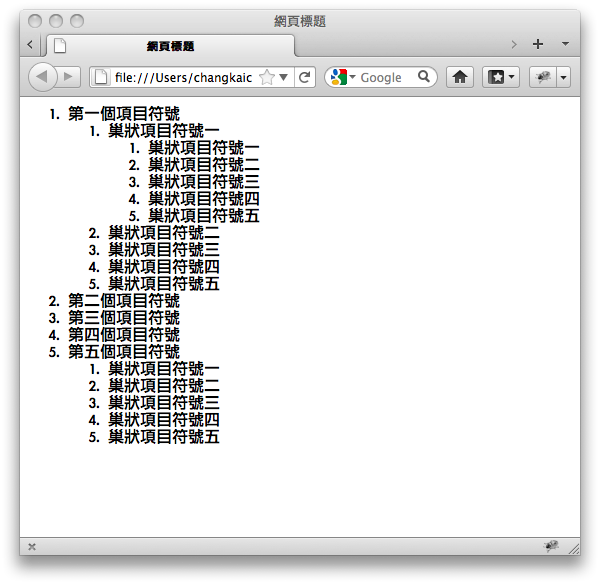
<ol> 可以是巢狀的,也就是說編號清單中可以有其他的編號清單,預設的編號則是阿拉伯數字,每一層都會縮排。
利用 type 屬性可以指定編號的種類, start 屬性可以指定編號起始值,例如
<html>
<head>
<title>網頁標題</title>
</head>
<body>
<ol type="i">
 <li>第一個項目符號</li>
 <li>第二個項目符號</li>
</ol>
<ol type="A">
 <li>第一個項目符號</li>
 <li>第二個項目符號</li>
</ol>
<ol start="7">
 <li>第一個項目符號</li>
 <li>第二個項目符號</li>
</ol></body>
</html>

<!-- 《程式語言教學誌》的範例程式
     http://pydoing.blogspot.com/
     檔名:listexample04.html
     功能:示範 HTML 4.01 標記語言的使用
     作者:張凱慶
     時間:西元 2011 年 5 月 -->
同樣用瀏覽器開啟,如下
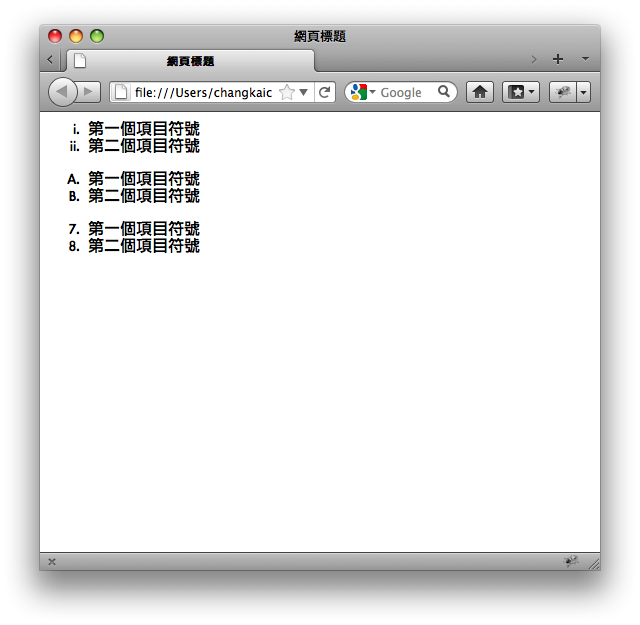
編號有 'a' 、 'A' 、 'i' 、 'I' 、 '1' 等五種。
| 中英文術語對照 | |
|---|---|
| 區塊元素 | block element |
| 瀏覽器 | broswer |
您可以繼續參考
相關目錄
HTML 4.01 快速導覽 - 目錄
HTML, CSS 教材
首頁
參考資料
http://www.w3.org/TR/1999/REC-html401-19991224/struct/lists.html
http://www.whatwg.org/specs/web-apps/current-work/multipage/grouping-content.html#the-ol-element
http://www.whatwg.org/specs/web-apps/current-work/multipage/grouping-content.html#the-li-element
https://developer.mozilla.org/en/HTML/Element/ol
https://developer.mozilla.org/en/HTML/Element/li
http://www.whatwg.org/specs/web-apps/current-work/multipage/grouping-content.html#the-ol-element
http://www.whatwg.org/specs/web-apps/current-work/multipage/grouping-content.html#the-li-element
https://developer.mozilla.org/en/HTML/Element/ol
https://developer.mozilla.org/en/HTML/Element/li


沒有留言:
張貼留言